 Desktamer
The best desktop pets for Mac in 2026
We make Desktamer, so we’ve put it first. The others are here because each is good at something, and we’ve tried to say what, fairly. Every price and version below is from the app’s own site, App Store, Steam or GitHub page, as of 30 September 2026.
At a glance
| App | Price | Where it lives | Your own pets | Focus and reminders | Also on |
|---|---|---|---|---|---|
| Desktamer | $9.99 once, after a free week (no card) | Bottom of the screen, menu bar, notch | Codex pets, GIFs | Focus, timers, water, reminders | Windows, Linux |
| Pets Therapy | Free, or all pets for $5.99 a year or $12.99 once | Roams, perches on windows | Yes | No | Windows, iPhone, iPad, Vision Pro |
| Mac Pet | $9.99 once | Menu bar or beside the notch | No | Pomodoro, streaks | No |
| Notchy | Free | The notch; its pet walks the bottom of the screen | No | Pomodoro, timers, Reminders | No |
| RunCat Neo | Free | Menu bar | Your own runners | No | Windows, as RunCat 365 |
| Desktop Goose | Pay what you like | Everywhere | Your own memes | No | Windows |
| Rusty’s Retirement | $6.99 | Bottom or side of the screen | No | No | Windows |
| Bongo Cat | Free, paid extras | Mac version is experimental | Cosmetics | No | Windows |
| OpenPets | Free, open source | The desktop | Codex pets | Focus and reminder plugins | Windows, Linux |
| NotiSprite | Free, or from $1.99 a month | Follows your pointer, roams, or a corner | Not stated | Reminders, focus timer | iPhone, iPad |
| MicroJoyz | $9.99 once, after a trial that needs a card | Walks along the Dock | Not stated | Reminders | No |
1. Desktamer
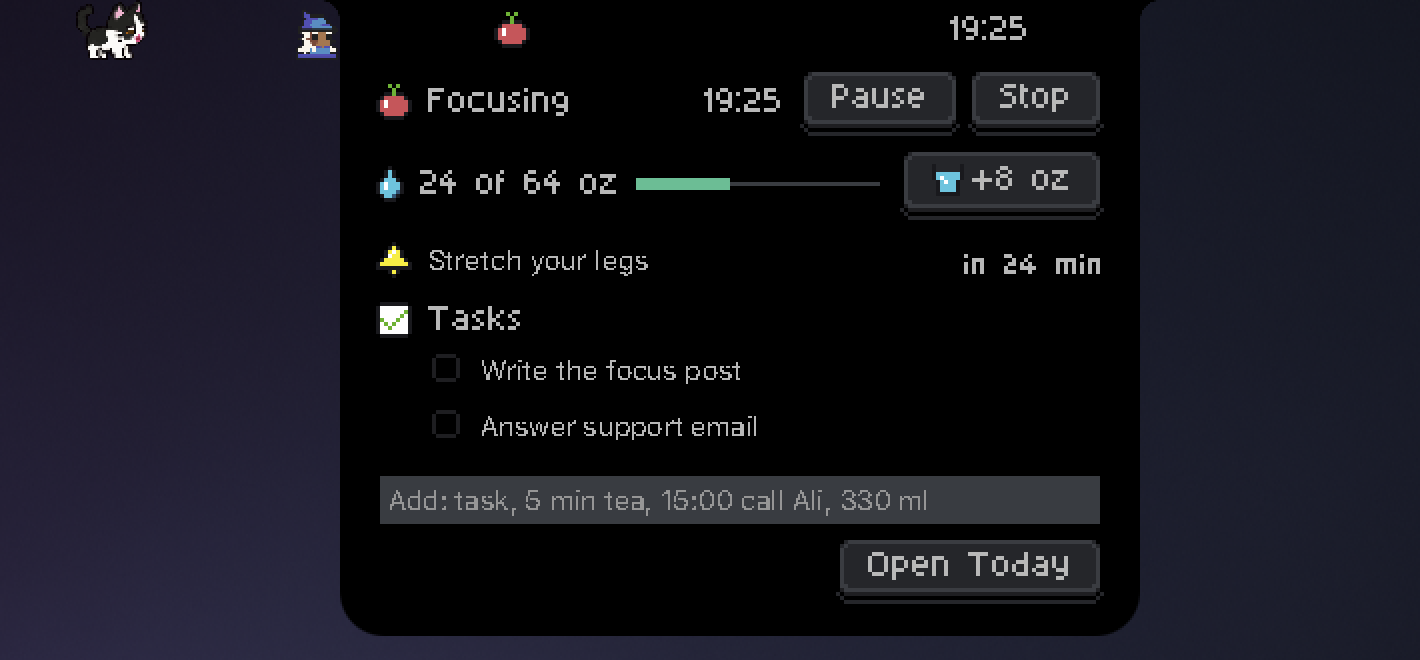
Pixel pets that walk along the bottom of your screen, climb into the menu bar when you drag them up, and nap. Each has food, energy and fun to look after, and joins your party in Quest, a small idle RPG where your pets are the heroes. None of the others here has one. On a MacBook, the notch opens into your day at a glance: your focus round, timers, water and reminders. Bring any Codex pet or animated GIF, or draw your own. $9.99 once, for up to three computers in any mix of Mac, Windows and Linux. Try it free for a week first, with no card, and you get your money back within 14 days of buying if it isn’t for you. macOS 13 or later, Apple silicon or Intel.
2. Pets Therapy
Pets Therapy has the biggest collection: more than 100 pets that roam your desktop and perch on the tops of windows. 37 of them are free for good. $5.99 a year or $12.99 once unlocks the rest. There’s food, toys, random events like UFOs and portals, achievements, and support for several screens. You can make your own pets from PNG frames and a JSON file. It’s updated often, and has 4.7 stars from 594 ratings on the Mac App Store. macOS 12 or later.
3. Mac Pet
Mac Pet puts a pixel cat or dog in your menu bar or beside the notch, with a Pomodoro timer: the pet is busy while you work and sleeps on your breaks. It keeps streaks with a five-week graph, and takes your Mac’s accent colour. $9.99 once, with no trial. macOS 10.15 or later. There are more timers with a pet, on the desktop and on your phone, in a focus timer with a pet.
4. Notchy
Notchy is a free “Dynamic Island” for your Mac’s notch, and its pet walks along the bottom of the screen: eight cats and dogs that react to your Mac’s heat, battery and music, and to your Pomodoro, with food, energy and friendship to look after. It also has timers and your Apple Reminders. Free, with donations welcome. macOS 13 or later.
5. RunCat Neo
RunCat Neo is a cat running in your menu bar, faster as your processor gets busier, with memory, storage, battery and network stats a click away. It’s free and open source, and you can draw your own runner. It needs macOS 26. The classic RunCat is being retired at the end of 2026.
6. Desktop Goose
Desktop Goose wanders your desktop, steals your pointer, and drags memes and notes onto your screen. Pay what you like. The Mac version (0.22) is behind the Windows one (0.31), and mods are Windows only. macOS 10.10 or later. Esc doesn’t send him away on a Mac: here’s how to quit Desktop Goose.
7. Rusty’s Retirement
Not a pet, but close: an idle farming game in a strip at the bottom or side of your screen, where robots tend the crops while you work. $6.99 on Steam, for Mac and Windows. There are more games like it in idle games that play at the bottom of your screen.
8. Bongo Cat
Bongo Cat is a free Steam game: a cat that bangs along with every key you press, earning points and items, with hats, skins and multiplayer. Its Mac version has been experimental since March 2026. Single items cost $2.50 and packs about $5 to $10. Here’s how to get Bongo Cat on a Mac, including an open-source version that isn’t an experiment.
9. OpenPets
OpenPets is free and open source, and like Desktamer it plays Codex pets. It talks to Claude Code, Cursor and MCP, and has plugins for focus timers and reminders. Its Mac builds may not be signed. Also on Windows and Linux.
10. NotiSprite
NotiSprite’s sprite follows your pointer, roams, or sits in a corner, and reminds you to drink water, stretch and sleep, with a focus timer and calendar alerts. It’s free, with sprites and plans from $1.99 a month, $19.99 a year or $39.99 once. macOS 14.6 or later.
11. MicroJoyz
MicroJoyz has pets that walk along your Dock, which you can throw, with reminders and a portal that sends your pet to a friend’s Mac. It’s $9.99 once after a three-day trial that needs a card, and an optional AI plan is $7.69 a month. Mac only for now.
What about Shimeji?
Shimeji are the classic desktop mascots: characters that climb your windows and fall off them. On a Mac today, no Shimeji runner is both maintained and signed. Shimeji-ee runs only on Windows. A Mac fork last came out in 2022 and needs a way past macOS’s security warning. Shijima-Qt runs on Apple silicon, but was archived in April 2026. For pets that walk on your windows and perch on their edges, Pets Therapy is the closest one that’s still updated. Still set on Shimeji? Here’s every way to run Shimeji on a Mac, and what each one needs.
How to choose
- Lots of pets, roaming everywhere: Pets Therapy.
- A Pomodoro timer with a pet: Mac Pet, or Notchy for free.
- A pet you look after, with quests, on your Mac and your other computers: Desktamer.
- Something small and free in the menu bar: RunCat Neo.
- Chaos: Desktop Goose.
On a Windows PC too? Here are the best desktop pets for Windows. On Linux, see what runs, and why Wayland makes it hard. Worried about speed or battery? Here’s what a desktop pet costs your computer.